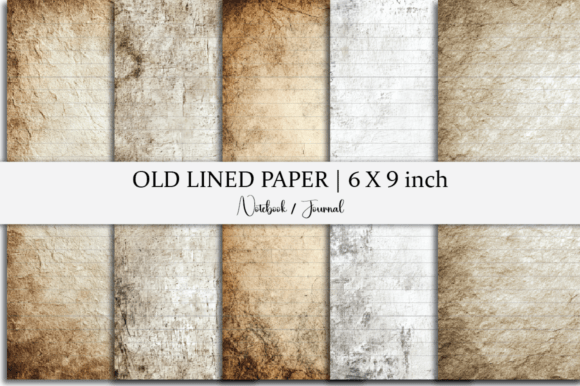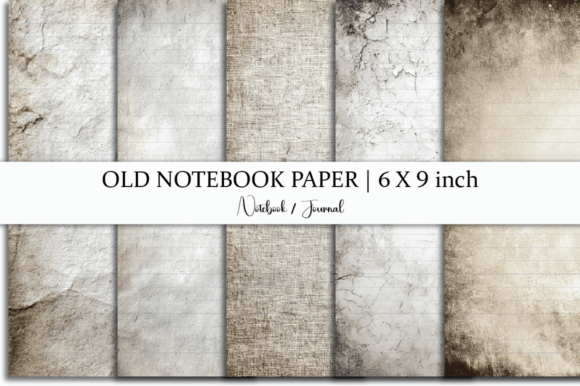
Old Grunge Paper with Lines: A Practical Look at Vintage-Lined Digital Paper for Writers and Designers
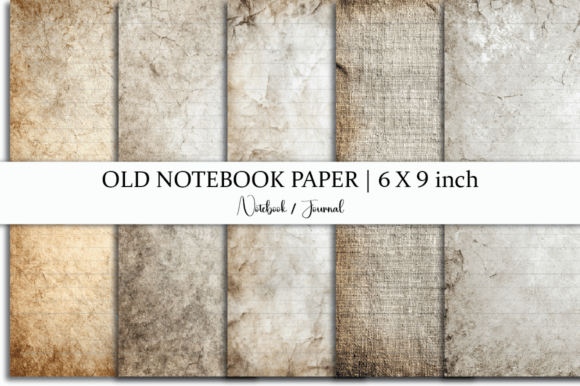
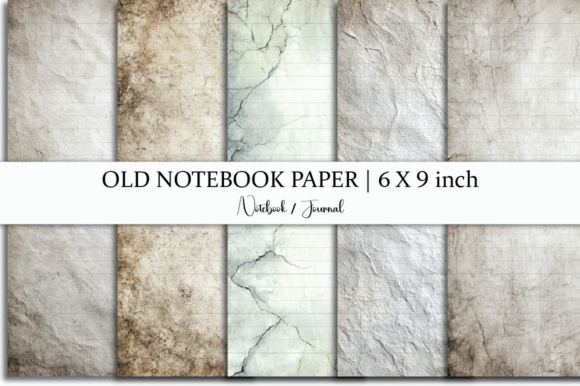
Old Grunge Paper with Lines refers to a digital resource designed to replicate the tactile, weathered texture of aged notebook paper—complete with visible fiber, subtle discoloration, faint stains, and soft, hand-drawn or slightly uneven line rulings. Unlike crisp, modern lined templates, this style embraces imperfection: ink bleeds subtly, lines waver just enough to feel human-made, and the background carries warmth and history. It’s not just about aesthetics—it’s about evoking focus, slowing down the writing process, and grounding digital work in analog sensibility.
What Makes Old Grunge Paper with Lines Distinct?
The key differentiator lies in its intentional aging—not as visual clutter, but as layered authenticity. The grunge effect isn’t random noise; it’s calibrated to suggest decades of gentle use: light coffee-ring shadows near margins, faint crease marks across the page, and a warm, off-white base tone that avoids the sterility of pure white. The lines themselves are drawn with slight variation in weight and spacing, mimicking how ink might behave on real vintage paper—never perfectly uniform, never digitally “too clean.”
This contrasts sharply with standard lined paper templates, which prioritize legibility and consistency over character. It also differs from generic “vintage” overlays that apply heavy sepia filters or dramatic distressing—effects that can overwhelm text or interfere with readability. Old Grunge Paper with Lines strikes a balance: the texture supports, rather than competes with, written or typed content.
How It Compares Across Common Use Cases
Digital journaling, note-taking, and print-on-demand publishing each place different demands on paper templates. Here’s how Old Grunge Paper with Lines fits—or doesn’t—within those contexts:
- For digital journaling apps (like GoodNotes or Notability): The JPG and PNG files load cleanly and scale well on tablets. Because the lines are embedded in the image—not generated by the app—the ruling remains consistent regardless of zoom level. However, users who rely heavily on handwriting recognition may find the textured background slightly reduces accuracy compared to high-contrast, minimalist templates.
- For printed notebooks or stationery design: The 6 x 9 inch size matches common paperback and journal dimensions. The PDF includes crop marks and bleed-ready edges, making it production-ready for small-batch printing. That said, if you’re ordering offset-printed books through a commercial printer, you’ll need to confirm whether the subtle tonal variations reproduce faithfully on uncoated stock—some presses flatten fine texture gradients.
- For graphic designers building branded stationery: The inclusion of source files (likely layered PSD or AI) allows for selective editing—adjusting line density, shifting contrast, or isolating the paper texture for use as an overlay. This flexibility is valuable, but only if you have access to and familiarity with professional design software. Beginners may find the source file less immediately useful than the ready-to-use JPG/PNG versions.
Strengths and Realistic Tradeoffs
One strength is versatility across formats: the same set serves equally well for screen-based reflection, printable PDF journals, or as a base layer in layout software. The grunge texture adds depth without sacrificing function—lines remain clearly legible at standard reading sizes, and the paper tone sits comfortably between warm and neutral, avoiding yellow tones that can strain eyes during long sessions.
A notable tradeoff is resolution dependency. While the files are high-resolution, extreme enlargement (e.g., printing at poster size) may reveal pixelation in the JPG version. For large-format output, the PDF or vector-based source file would be preferable—if available in true vector form. Also, because the lines are baked into the image, you cannot dynamically adjust spacing (e.g., switch from college-ruled to wide-ruled) without editing the file itself.
Another consideration is accessibility. Readers with low vision or contrast sensitivity may prefer higher-contrast options—such as black lines on stark white—or adjustable digital templates where font size and line height can be modified independently. Old Grunge Paper with Lines assumes a baseline of visual comfort with muted tones and soft edges.
When It’s the Right Choice—and When It Might Not Be
Old Grunge Paper with Lines works best when atmosphere and intentionality matter more than absolute precision. Writers using it for morning pages, reflective journaling, or creative brainstorming often report feeling more grounded and less distracted—likely due to the visual cues that signal “this space is for slow, thoughtful work.” Educators designing printable handouts for historical or literary units sometimes choose it to reinforce thematic tone without sacrificing structure.
It’s less ideal for technical documentation, legal notes, or any context where rapid scanning, strict alignment, or machine readability are priorities. Similarly, if your workflow depends on dynamic reflow (e.g., switching between portrait and landscape layouts automatically), static image-based pages won’t adapt—they’re fixed in orientation and scale.
Consider alternatives if you need:
- Adjustable line spacing: Look for editable PDFs with form fields or SVG-based templates that allow real-time resizing.
- High-contrast clarity: Minimalist lined templates with bold, sharp lines and pure white backgrounds offer stronger visual hierarchy for dense note-taking.
- Multi-format flexibility: Some digital planners include both lined and blank variants, plus tabbed sections and hyperlinked TOCs—features beyond the scope of a static paper template.
Practical Evaluation Tips Before Downloading
Since this is an instant digital download—no physical item shipped—it’s worth checking a few things before purchase:
- Preview the actual files: If a seller provides thumbnails or sample pages, open them at 100% zoom. Check whether line weight feels appropriate for your pen thickness or font size.
- Verify compatibility: Confirm the JPG/PNG are RGB (not CMYK) if using for screen work, and that the PDF meets print standards (e.g., 300 DPI, embedded fonts if applicable).
- Assess texture subtlety: Scroll through all five pages. Some sets repeat patterns; others vary texture per page. Variation adds realism but may complicate batch printing if consistency matters.
- Review licensing terms: Most personal-use licenses allow unlimited printing for your own journals or classroom handouts—but commercial resale (e.g., bundling into a paid planner) usually requires explicit permission.
Finally, reflect on your typical workflow. Do you write longhand first, then digitize? Prefer typing directly onto a textured background? Print weekly spreads and annotate by hand? Old Grunge Paper with Lines supports all of these—but only if the visual language aligns with how you think and create. Its value isn’t in novelty, but in quiet consistency: a familiar, unobtrusive surface that invites sustained attention.
Final Thought: Texture as Tool, Not Decoration
In a digital environment saturated with sleek interfaces and frictionless tools, choosing Old Grunge Paper with Lines is a small act of intention. It doesn’t speed up your process—but it may deepen it. That’s not universally needed, nor is it objectively “better.” But for those who benefit from sensory grounding, historical resonance, or simply a break from algorithmic perfection, it offers something functional and quietly meaningful: paper that feels like it has been held, written on, and lived with—even before you begin.