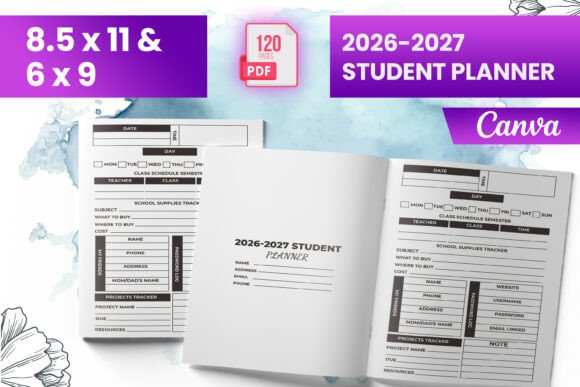
2026-2027 Student Planner KDP
If you're building, selling, or customizing planners on Amazon KDP—or designing for clients who do—the 2026–2027 Student Planner KDP isn’t just another interior file. It’s a production-ready asset engineered for speed, compliance, and consistency. This planner bridges the gap between creative design and platform-specific publishing requirements—no reformatting, no guesswork, no last-minute bleed corrections before upload.
It’s built for people who treat publishing like a repeatable workflow: educators launching supplemental learning tools, freelance designers scaling their Canva template shops, small publishers testing seasonal planner niches, or solopreneurs bundling digital + print products. The value isn’t in novelty—it’s in reliability. You get what you need, when you need it, without detours.
How the 2026–2027 Student Planner KDP Fits Into Real Publishing Workflows
Most KDP interiors stall at the “almost ready” stage: margins too tight, bleed misaligned, page count inconsistent, or file formats rejected during preview. The 2026–2027 Student Planner KDP eliminates that friction. Its interior is pre-tested on KDP—meaning it passes automated checks for trim, bleed, resolution, and layer flattening. That’s not theoretical. It’s verified.
Use it before a launch to lock in your production timeline. Instead of spending hours adjusting PDFs after KDP’s preview tool flags issues, you start with a known-good interior. That means faster iterations if you’re A/B testing covers, bundling with companion resources (like habit trackers or grade logs), or localizing for different academic calendars.
Use it during a project when you’re managing multiple SKUs—say, a set of student planners for middle school, high school, and college. This interior gives you a consistent structural baseline: same page count (120), same trim sizes (6″ × 9″, 8.5″ × 11″), same intro logic. That uniformity simplifies inventory tracking, metadata setup, and even customer support templates.
Use it after a sale—not as a static deliverable, but as a foundation for updates. Because the files include both PDF (for KDP upload) and source-compatible PNG/JPG exports, you can quickly swap out dated academic dates, add new semester layouts, or localize holidays without rebuilding from scratch.
What’s Inside—and Why Each Piece Matters
The package delivers exactly what experienced KDP users need—not more, not less:
- Ready-to-upload PDF file: Flattened, CMYK, 300 DPI, with 0.125″ bleed fully extended. No transparency warnings. No font embedding errors. Upload it directly to KDP and move to proofing.
- Multiple trim sizes: Covers 6″ × 9″, 8.5″ × 11″, and standard US letter dimensions. Not scaled copies—each is individually composed to preserve spacing, margin integrity, and readability across formats.
- 120 total pages: Includes an intro page, weekly/daily spreads, goal-setting sections, assignment trackers, and blank note pages. Structured to support semester-long use without forcing users to flip constantly or write in margins.
- KDP-tested files: Verified against current KDP guidelines (as of Q2 2024). That includes spine calculation readiness, bleed extension validation, and image compression thresholds—all confirmed in live preview mode.
- PNG and JPG exports: High-res, RGB and CMYK variants included. Useful for mockups, social ads, Canva-based listing visuals, or client presentations where layered PSDs aren’t needed.
Crucially, the interior is bleed-ready. That means background elements, borders, and full-page designs extend safely beyond the trim line—so nothing gets cut off when KDP crops the physical book. Many designers skip this step or estimate bleed manually; this version removes the risk entirely.
Integration With Your Existing Tools and Platforms
This planner interior doesn’t exist in isolation. It’s designed to slot into common creator stacks:
- Canva users: Drop the PNG/JPG files directly into Canva templates for listing banners, Pinterest pins, or email headers. Match fonts and color palettes from the interior to maintain brand continuity across digital touchpoints.
- KDP sellers: Pair it with your own cover generator (or a pre-made cover bundle) and publish across multiple categories—Student Planners, Academic Planners, Back-to-School Supplies—without changing interior logic.
- Educators & curriculum designers: Use the 120-page structure as a scaffold for adding subject-specific inserts—math practice grids, lab journal prompts, or reading log extensions—without disrupting the core layout.
- Freelance designers: License or white-label this interior for clients needing fast-turnaround planner projects. The KDP compliance means less back-and-forth over technical specs and more time refining content or branding.
No plugin, no converter, no third-party validator is required. It works inside KDP’s native upload flow—and stays compatible through routine platform updates because it follows documented best practices, not workarounds.
Practical Implementation Tips for Consistent Results
Getting predictable outcomes starts before upload:
- Verify trim size match: Double-check that your chosen KDP trim size matches the interior file you select. Don’t assume 8.5″ × 11″ works for all paper types—KDP treats “Standard Portrait” and “US Letter” differently depending on paper stock. Use the exact dimension labeled in the file name.
- Keep cover and interior aligned: If you’re designing your own cover, ensure its bleed (0.125″) and safe zone (0.25″) align with the interior’s extended background. Misalignment shows up as white edges or cropped art in final proofs.
- Test one format first: Upload the 6″ × 9″ version, order a physical proof, and confirm gutter spacing, ink density, and page turn feel. Once validated, scale confidence—not effort—to other sizes.
- Preserve metadata discipline: Use consistent title phrasing (“2026–2027 Student Planner”) across your KDP dashboard, backend keywords, and external listings. That reinforces topical relevance for both algorithms and buyers scanning search results.
- Update seasonally—not annually: Since this is built for the 2026–2027 academic year, plan your launch for late summer 2026—but begin marketing in early 2026 using teaser assets from the included PNGs. That timing aligns with back-to-school buyer intent cycles.
Long-Term Usability and Quality Control
A good KDP interior isn’t just compliant—it’s maintainable. This planner supports long-term use because:
- Page count is divisible across standard printing signatures (e.g., 120 pages = 15 × 8-page sections), reducing binding stress and minimizing blank pages.
- Typography is optimized for legibility at 10–12 pt sizes—critical for students writing by hand or professionals annotating during lectures or meetings.
- No proprietary fonts or embedded scripts mean no licensing surprises or rendering inconsistencies across devices or print runs.
- The intro page is intentionally minimal: space for student name, grade level, school, and contact info—making it reusable across age groups without redesign.
You’re not buying a static PDF. You’re acquiring a repeatable component—one that scales with your output, adapts to your audience’s needs, and holds up under KDP’s evolving technical standards. That’s how planning tools earn staying power: not through novelty, but through precision, predictability, and quiet reliability.